
mBot Ranger is a STEM robotics kit from Makeblock, in their large line of excellent educational electronics.
They sent me this kit to review as around 6 years ago I enjoyed their “Ultimate Robot Kit”. Let’s see how this one compares!
mBot Ranger Features and Specifications
- Unlike traditional Arduino-based robotics kits, this robot also offers a choice of using a scratch-like visual drag and drop flowchart programming system, eliminating syntax errors and making coding more accessible for beginners.
- It features an IR line following sensor, ultrasonic collision avoidance sensor, and Bluetooth connectivity for remote control via an app.
- You can even code the robot using your phone or tablet, without the need for a wired connection.
- Coding can be learned through interactive games for a more gradual and engaging learning experience.
mBot Ranger unboxing
The mBot is extremely well packaged, in that, yes, everything is well protected, but also I imagine a kid getting this as a gift to open would be truly excited to reveal the contents.

With any robot kit, there are a few groups of elements you need to consider:
- The robot construction
- Actuators
- Electronics “brain”
- Software
- Control
Your first layer reveals the Arduino-compatible electronics board in it’s plastic case, along with the first metal parts and some tires.

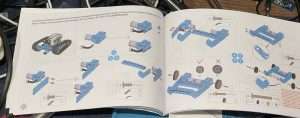
As manuals go, this is nicely printed with multiple languages represented, and high resolution photographs. Did I reference the manual very often? No comment …

A nice inclusion is a screwdriver with both ends that you need to complete the projects. Of course you also get the special cables, the remaining parts, and some tank treads.

Also important for the projects are the ultrasonic distance sensor and the infrared line following sensor.

No robot kit would be complete without motors and an electronics controller board.

mBot Ranger Electronics
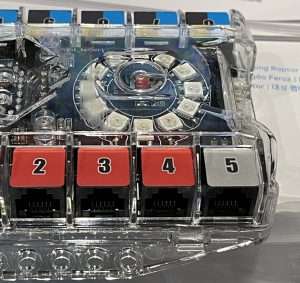
The mBot ranger comes with a nice Arduino-compatible board called Me Auriga, containing a bunch of sensors.
A closer look at the main board reveals the special sockets for the wiring, plus a welcome sight of addressable RGB LEDs in a ring.
Sensors included:
- Light sensor
- Sound sensor
- Gyroscope
- Temperature
- Ultrasonic (breakout)
- Line follower (breakout)
Building the mBot Robot
- The robot can be built in three different supplied configurations (Land Raider, Nervous Bird, or Dashing Raptor) or of course, build your own designs.
- Makeblock offers several models for you to choose from on their website.
- The kit provides aluminum parts rather than plastic, ensuring sturdiness and durability. Especially as you know most kids will want to battle their robots!
- Assembly is straightforward, with clear instructions and accompanying images. Kids will need a hand in some areas and expect builds to take around an hour, especially if you are explaining things.
- The provided toolkit and screws make the assembly process convenient.
- Note your robot requires Double-A batteries for power, and while it does come with a battery case, the Li-polymer Battery Pack for mBot Ranger is an additional purchase. Make sure you at least have spares on hand.

Getting Started

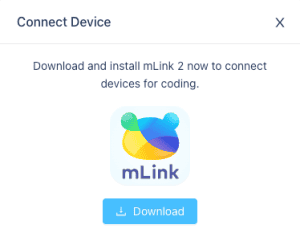
First step is to download the Makeblock app from the App Store. Connectivity can be established via Bluetooth, and then the app allows you to control and program the robot.
The app provides real-time data and features like ultrasonic monitoring and brightness sensing.
You might need to update your firmware for certain features.

mBot Ranger Review: Conclusion
The mBot Ranger Robot kit from Makeblock offers a high-quality and engaging learning experience for children aged 10 and up.
Having the drag and drop programming system, physical movement, and range of built-in sensors make it an excellent choice for introducing coding and robotics concepts to your own family or the classroom.
The sturdy aluminum parts and versatile design especially make it suitable for classroom or makerspace environments.
In conclusion, the Makeblock mBot Ranger Robot is a fun and educational tool that allows users to create their own programs and explore various applications.
That all said it is not the cheapest out there but the quality of construction, the included features, and the range of software and programming options set it above your basic robotics kit, and extend the enjoyable lifetime of the product beyond a simple one-off build.
Check out all the details and current pricing over at the official site.

 IKIER K1 Pro MAX Review: 48/24W Diode Laser Cutter