
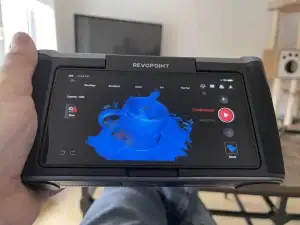
Revopoint Miraco 3D Scanner reviews were popular a little while ago because as well as being an exciting piece of technology that got the interest of 3d scanning and CAD enthusiasts, it was also a wildly successful technology Kickstarter.
So what is it and why did it get so much attention?
As the name implies, it is a device designed for 3D scanning, but unlike scanners that you might have seen before, it has several new features that make it both user-friendly and more powerful, even for non-experts or those of us who have up to now not even been in the market.
The key feature, and the one most obvious at first glance, is it runs standalone rather than tethered to a computer. It is described as an “all-in-one” scanner, as it includes a nice colour touch screen and built-in brains.
3D Scanning in 2024
Before we get into how this specific device fares, we should talk about where the field is at with 3D scanning, and where we have been up to recently.
The dream is to have the Star Trek replicator experience. Scan your object, and send it to your 3D printer. For example, scan a Dungeons and Dragons miniature or prop for customization and then print off your personalized item. That said, I think most of us realize there still might need to be some processing and fiddling with the results to get the output you want.
More pragmatically, in many cases what we really need is reference geometry and measurements rather than take a scan direct to our intended application. For example, my wife makes miniatures for doll houses and has me replicate household items where sizing and scale are more important than getting accurate surface texture.
Consumer 3D Scanning Technology
There are now several broad categories of scans that are actually in regular use and you will note the Revopoint Miraco incorporates both a colour camera and structured light:

- Photogrammetry – Many photographs are taken of the subject and different angles, with the 3D scene stitched together in software. This is highly popular for video game objects especially because it can be done with a regular camera or smartphone and it is excellent at capturing detailed textures. The downside is it requires very good lighting and a stable setup, and it is more suitable than “low poly” with great textures rather than accurate geometry.
- Structured Light Scanning – Structured light scanners project a pattern of light onto the object and analyze the deformation of the pattern to create a 3D model. This approach is good for capturing detailed and complex shapes but is expensive, sensitive to lighting conditions, and is not ideal for scanning larger objects.
- Time-of-Flight (ToF) Scanning – ToF scanners use the time it takes for a pulse to bounce back from the object to measure distance and create a 3D model, making it suitable for large objects or 3D environments, but it is much lower accuracy and resolution compared to structured light or laser scanning, so struggles with small objects or fine details.
- LiDAR (Light Detection and Ranging) – LiDAR scanners emit laser pulses to measure distances and generate a 3D map of the surroundings. It’s similar to ToF but often more precise and used in more advanced applications. This is how the face scan features are integrated into some smartphones such as the more recent iPhone, and offers fast and semi-accurate scanning. You won’t get the detail of structured light or laser scanning, however, performance can still be affected by surface reflectivity.
I kind of gave up on 3D scanning a few years ago because while I really wanted to be able to qiuckly scan then print, we were at that point nowhere close, regardless of how these devices were marketed.
My buddy Ben rigged up an Xbox Kinect at a Maker Faire for 3D scanning kids’ heads to make Lego minifigs, but outside of that, we didn’t really see consumer-level 3D scanning producing the resolution we need to make it compete with calipers and CAD skills.
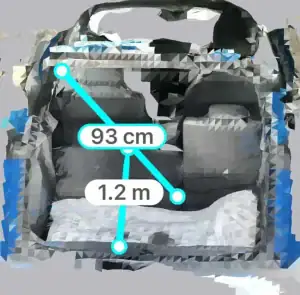
When my iPhone came with scanning capability along with high-quality camera stills for photogrammetry, I tried the available apps, and still was not impressed in terms of raw output, but at least we finally had something that could replace and not just supplement manual measurements.
Using these scans has become second nature for me when trying to figure out if I have enough storage capacity in my car or garage for hauling around 3d printers and CNC machines!
Now with the Revopoint Miraco we are finally getting to the point where a scanner could be a useful addition to your toolkit, because the software, the processing power, and the optics have greatly improved.
Specifications of the Revopoint Miraco 3D Scanner
The Revopoint Miraco is unusual as the specs are closer to a handheld gaming device, smartphone, or an Android tablet than what you would expect from a 3d scanner, as it includes a powerful computer, a high-resolution camera, and a really nice 6″ colour touch screen.
| Processor | 8-core CPU,2.4 GHz (Android) |
| Memory | 16 GB or 32 GB DDR4 RAM |
| Storage | 256 GB eMMC |
| Screen | 6″, 2K AMOLED (180° Adjustable) |
| Connectivity | Wi-Fi 6 or USB Type-C 3.1 |
| Precision | Up to 0.02 mm |
| Scanner | Up to 15 fps, Quad-camera Infrared Structured Light, Max Volume 4m × 4m × 4 m |
| Camera | 48 Megapixels, 8K colour capture |
| Scanning Modes | Single-shot & Continuous, small and large object modes |
| Video Output | Screen mirroring and USB-HDMI included with Pro |
| IMU | 9-axis |
| Battery | 5000 mAh battery (2-year warranty), Up to 2 Hours of Scanning, recharge 80% in ~35mins using included 65W Dual USB Type-C Port Power Adapter |
| Weight | 750g |
What’s in the Box?
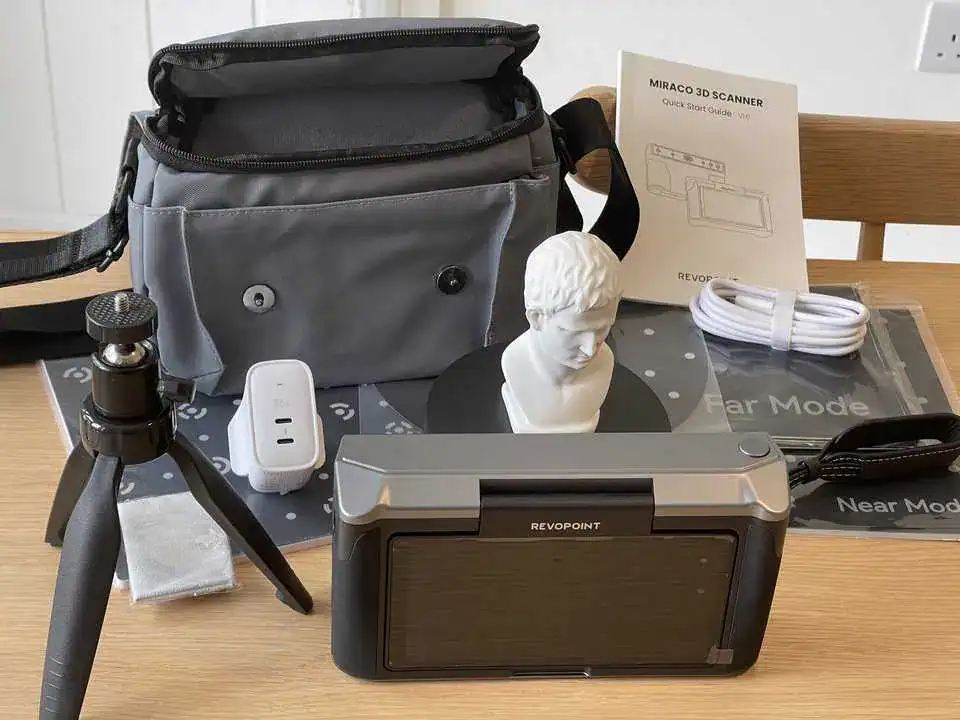
I was sent this kit to review so you might receive different stuff, but here’s what came with my Miraco 3D scanner:
- Small turntable
- USB-C cable and charger
- Small desktop tripod
- Wrist strap
- A small model bust for testing
- Markers for different scanning modes
- Calibration card
- Carrying case
- User guide
Revopoint Miraco Design and Features
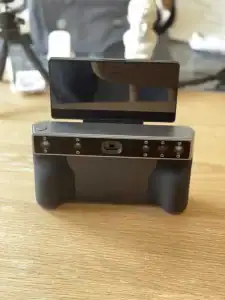
The Revopoint Miraco has a nice, premium camera style look and feel, though the glossy finished parts do attract greasy fingerprints.
It offers multiple scanning modes, including both near and far modes.
This is unusual as often 3D scanners are only able to focus on smaller, close-up or larger and more distant objects, but here you can scan objects at varying distances.
There is a selfie mode for capturing detailed facial scans, which captures a high level of detail, but I do not recommend it because of how difficult it is to scan your own head without moving!
Two memory options are available depending on if you have regular or pro (16GB and 32GB). Even with my smaller option, the device performs well, handling scans efficiently without major issues.
As this is a portable computer with scanning capability, it is nice that Miraco also includes over-the-air (OTA) update capabilities.

This means the device can receive software updates via Wifi to improve performance, fix bugs, or add new features over time. This is a significant advantage as it ensures the scanner stays up-to-date without needing to be sent back to Revopoint.
My only complaint with anything in the entire kit – which is super generous, by the way – is the wrist strap. Having a wrist strap is an excellent idea given that this is expensive and portable, but it screws into the tripod thread so using the wrist strap means you can not lie the device down on a flat surface or use the tripod!
Revopoint Miraco Performance
Your main reason to own a Miraco is its scanning capabilities, and fortunately, this is a place where it shines. It can capture details incredibly well, even picking up on fine textures like hairlines, which can be challenging for many scanners, especially on darker surfaces.

The scanner uses a combination of two main cameras and a third infrared camera, which helps in capturing 3D models with high accuracy.
However, the Miraco does have some limitations, particularly with shiny or dark objects. The device sometimes struggles with reflections or very dark surfaces. This is not unique to the Miraco, it’s a common issue across many scanners.
Many reviewers suggest using scanner spray to temporarily lighten dark objects and remove shine, making them easier to scan. The official spray covers the object with a powder that evaporates after about 4 hours.
I didn’t want to spend that much money so I don’t know how well that works, but after a tip on a forum, I found dry shampoo can help at a much lower cost but requires you to clean up using an air blower or water.
Although the battery life is somewhat short-lived, with up to 2 hours of continuous scanning, it does have the facility to connect an external battery pack or work tethered to your computer, and it recharges very quickly.
Revopoint Miraco 3D Scanner in Action
Fortunately for 3D scanning newbs like me, the user interface is highly intuitive, just touch, swipe, and drag like on any Android device.

You have the option of doing everything on the device itself, or just using the Miraco to capture and then using your Mac or Windows desktop computer to do all the processing over USB or Wifi.
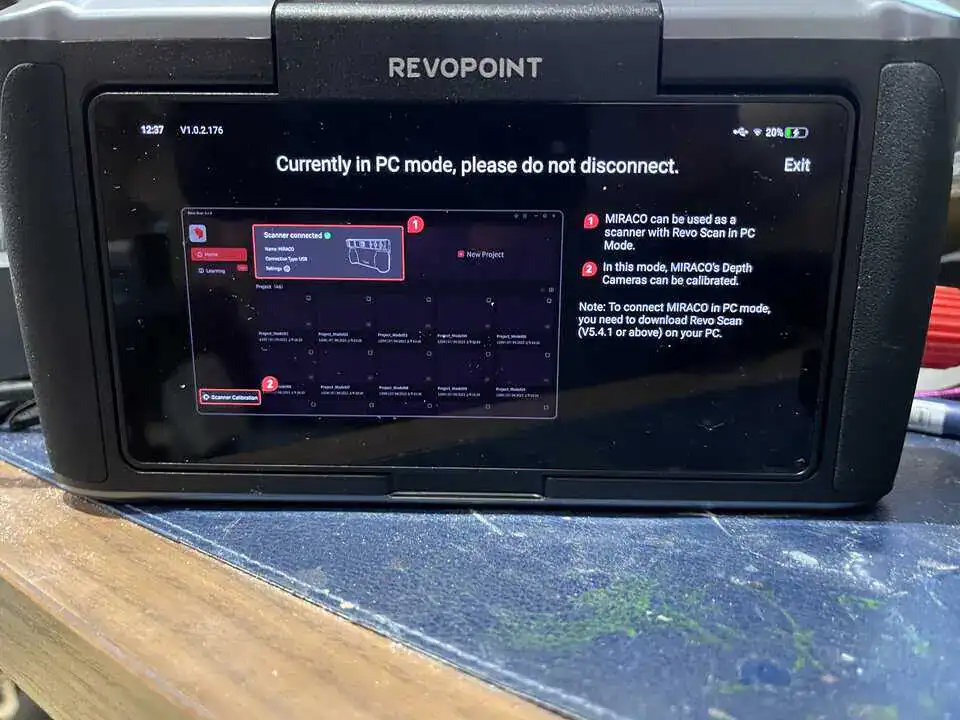
The Miraco software includes options for one-click automatic meshing and processing, which simplifies the process and delivers reassuringly good results.
For those who are more experienced and prefer more control, the software allows for manual adjustments and refinements.

Either way, if you are looking to create 3D models for 3D printing, you might still want to go in and clean up the model by filling in any holes and getting rid of unwanted parts.
A criticism from some reviewers was not having a visible battery indicator but this must have been fixed in my updated firmware, but as you can see in my photographs, I have an icon showing battery life percent remaining just like on smartphone user interfaces.

Initially, my scans were pretty rough, until I learned to first use the turntable and tripod (both included in my kit), and then also where possible to use the tracking helper marker dots.
Using the dots provides the scanner with more points of reference to figure out the orientation of your object, because anything with a lot of smooth, uniform texture can make the scanner lose track.
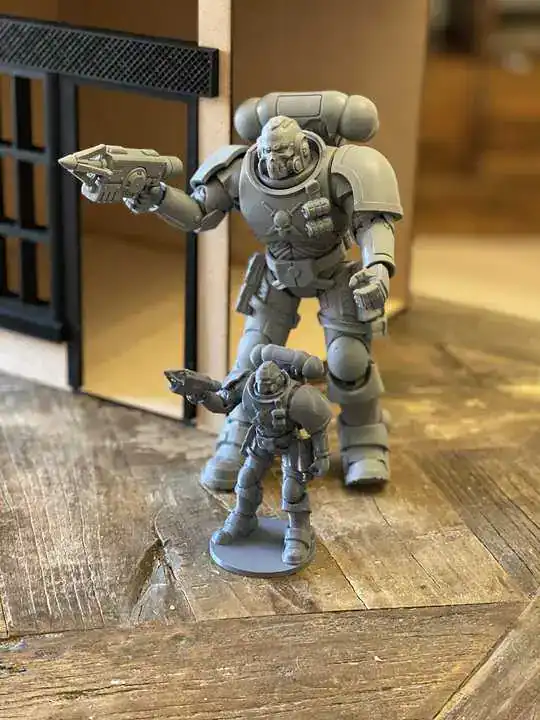
Once I got the hang of things, I was able to exceed my expectations and not just get reference scans but 3D printable 3d objects such as this Space Marine action figure, printed at a smaller scale.
I was happy with the results I got from the scan, especially considering I am a novice at this kind of thing. Most details were captured well.
Even so, my main use case is getting quick and accurate measurements, or geometry that would be difficult to get another way, and without following the calibration instructions, I found under good conditions the scanner to be highly accurate.
Revopoint Miraco Review Conclusion
The Revopoint Miraco 3D Scanner blew me away and it deserves to be a leader in the 3D scanning market, especially for those looking for a device that is both powerful and user-friendly.
Standout Features of the Revopoint Miraco 3D Scanner
Portable: All-in-one and untethered so you can scan for up to 2 hours on a single charge without towing around a laptop.
Flexible Scanning and Good Accuracy: The scanner can capture details with great accuracy, as close as 10 cm, or from a distance of up to 1 meter, meaning instead of buying multiple specialist devices, one scanner can do it all.
User Experience: The touch screen UI and responsiveness mean it is well-suited for hobbyists, educators, and professionals alike.
While it has a few areas for improvement, such as its handling of shiny or dark objects, the overall performance and intuitive design make the Revopoint Miraco a recommended investment.
Get the Full Details and Buy
Use the code SAS02 to get a 20% discount
Check today’s price and see the full product details on the official site using the button below:

 xTool M1 Ultra Review