

Do you find your workspace filling up with smoke and smells when laser engraving or cutting?
Fume extraction is one of those necessary headaches for laser users.
Pardon the pun!
Most standard extractors do an okay job but almost all of them require big, costly filters that often fall short of capturing all fumes, leaving lingering odors.
xTool has been working on a new Air Purifier, the AP2, and I got a chance to try it out.
xTool Safety Pro Line
xTool recently introduced the Safety Pro Line, and the AP2 Air Purifier is its flagship product.
They also released the IF2 Inline Fan, a separate but complementary product that’s about half the size of other options but with impressive airflow capacity, designed to communicate over Bluetooth with xTool’s AP2 or directly with their laser systems.
The AP2’s Filter Stages
Each layer in the AP2 serves a specific purpose, aiming to catch every particle, fume, and odor:
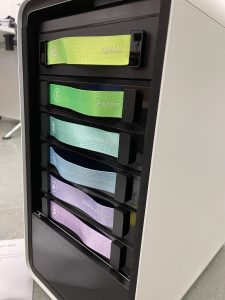
- Cyclone Stage: The initial stage pulls in air and removes large particulate matter.
- Prefilter: Catches remaining visible particles.
- HEPA Filter: Targets ultra-fine dust.
- Activated Charcoal Filter: Addresses odors and some fumes.
- Carbon and HEPA Filter: Adds another layer of fume and allergen capture.
- Ultra HEPA Filter: The final layer removes almost everything else, resulting in nearly pure air output.
This layered approach aims to both improve performance and reduce repeated, expensive replacements.
As someone who has had to pay the eye-watering Glowforge filter prices, I am hopeful that this will be a huge improvement.
Appearance and Controls
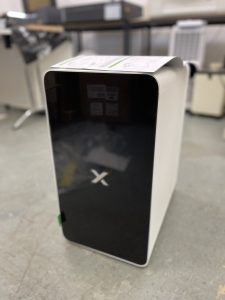
This filter looks like a high-end appliance rather than a workshop tool, a lot of care and consideration has gone into every aspect.
As well as integrating with xTool’s most recent line of lasers, you can also manually set the air power using the touch buttons on the top of the unit.
Dust and Odor Removal Performance
xTool published their performance data showing impressive results in both dust and odor removal.
The AP2 claims 99% effectiveness in removing fine particles down to 3 microns, which is ideal for capturing allergens.

For those sensitive to odors, the AP2 removes up to 98% of VOCs and about 97.9% of general odors. A big step forward in fume extraction.
I tested the AP2 myself by cutting MDF and acrylic, which usually produce strong, lingering smells, and with the MDF even visible smoke in the workshop.
The result, at least to my nose, was clean air.
Conclusion
It actually works, which is the best possible thing I can say about any fume extractor.
For xTool laser users who can’t vent outside, especially folks sharing a space with sensitive lungs, this setup is almost essential, it tackles fumes beautifully.
Although the IF2 is primarily for xTool systems, the AP2 itself is compatible with other laser setups, making it a solid choice for anyone needing a versatile fume extraction system.
In short, xTool’s AP2 finally provides a highly effective solution for fume extraction, setting a new standard in air purification for laser work.

 Two Trees TTC-450 Pro CNC Review