

The TwoTrees TTC-450 Pro CNC Router is a desktop CNC designed to handle a variety of materials, including wood, MDF, plywood, resin, PVC, ABS, carbon fiber, acrylic, aluminum, and brass, making it a versatile option for hobbyists just getting started with CNC.
While it is aimed at the market dominated by SainSmart and FoxAlien, this machine comes with a couple of things not found on the Genmitsu 4040 Pro.
Having now worked with the TwoTrees TTC-450 for some time, I wanted to share my experience, both good and bad.
First, let’s get into what’s included …
What’s In the Box?
The TTC-450 Pro was extremely well packaged and the box contained a couple of really nice surprises.
Here’s what you’ll get:
- TwoTrees TTC-450 Pro CNC Router and spoil board (mostly assembled, which is very welcome!)
- 775 Spindle motor
- Touch probe
- Protective glasses and, surprise! Ear protectors!
- Touch screen offline controller (nice!) with wifi (?)
- SD card and USB reader
- Various assembly tools such as hex wrenches, a file, snips, and a brush
- Hold down clamps
- Example end mills
- A piece of polypropylene plastic for test cuts
- ER-11 6mm collet
- USB cable
Optional Accessories
Also available at an extra cost are some very interesting accessories.
- 500W High-Speed Spindle Motor Kit
- Dust boot
- TwoTrees CNC Vacuum Cleaner Monster (M1) Kit
- 4th Axis CNC Rotary Module Kit
- End-mill bits kit
I felt the lack of a powerful spindle and dust management in particular, which very much limited the projects I could make with the machine.
Setting Up the TTC-450 Pro
Assembling CNC machines can be a bit daunting, and doubly so when the manufacturer doesn’t share your language.
This machine has been designed to get you up and running extremely quickly, and mainly involves attaching the X carriage, wiring, and installing whichever router/spindle you selected.
The written documentation when it comes to the wiring is not good for people unaccustomed to assembling machines such as these.
I am glad to say that TwoTrees provides a handy assembly video, which would have made things much easier had I found it before assembly.
A couple of wires might need some hot glue as they are prone to fall out, causing homing problems. Even so, I got there with the help of coffee and some light swearing.
Two Trees TTC-450 Pro User Experience
The frame is black and red anodized metal. It looks and feels high quality, and very solid.
It uses lead screws and Nema 23 motors, rather than the belts and Nema 17 combination of budget CNCs of the past.
Once I finally had everything connected all axes moved smoothly using the very convenient touch screen, but in homing the X-axis limit switch would randomly fail, which is how I found the loose wire issue mentioned earlier.
No dust boot comes with the machine so it is good that everything is nicely enclosed, keeping the electronics and lead screws clean. Sadly I can’t say the same about my workshop!
Another nice feature is the work area of 460 x 460 x 80mm (18.1×18.1×3.14 inches), though the usable area is affected by your spindle arrangement.
The bad news is the included spindle is not capable of cutting, it is more of an engraving router. This is common across all of these budget machines. At a guess, the included spindle is mainly so first they can call it a complete package and second, they’re aimed at beginner hobbyists.
You also only get one bracket which is sized for that small motor.
Of course, all this means you are going to have to upgrade the bracket and spindle before doing deep cuts into harder materials, but that was true of the Genmitsu 4040 Pro that I reviewed earlier too.
CNC Software: Easel and Carveco
I use the free Easel browser-based CAM software a lot for testing because it is so easy and familiar. It’s great for beginners because it offers conservative settings that help you prevent wasting bits and material.
Lately, I have been favouring Carveco Maker even though it is Windows only, preventing me from using my more powerful daily computer, and as a subscription, it certainly feels expensive unless of course, you are earning from what you are making, which would make it a business investment.

Gsender works well for controlling the machine beyond what you can do via the touch screen. None of the software I tried connected over wifi but I am told it does work so perhaps this is just a skill issue.
Pros and Cons of the Two Trees TTC-450 Pro
There are lots of pros and cons with the TTC-450, and all of them need to be taken in the context of how inexpensive the package is in comparison to competitors. It’s built for a price point but has premium features not found on CNC machines double the price or more …
Pros:
- Solid, robust construction with rigid metal components
- The included touch screen is a nice … touch
- The design is extremely well thought out and high-quality
- Great potential accessories for advanced projects or added convenience
- Generous price versus competitors
Cons:
- Poor documentation
- Slower than competitors (800mm/m vs 2000mm/m on Genmitsu 4040 Pro)
- Wi-Fi connection is unusable (for laser mode only?)
- The included spindle motor is not very capable of cutting
- Small community (as yet)
Comparison with Other CNCs
Feature-wise the TwoTrees TTC-450 Pro sits somewhere between value-focused CNC routers like the Sainsmart Genmitsu 4040 Pro and more premium options like the Sienci Longmill or Shapeoko series.
Its sturdy metal frame and lead screw design put it ahead of many belt-driven machines in terms of rigidity and accuracy, and the touch screen and fully covered construction give it a more premium feel than equivalently specced machines.
The Sainsmart Genmitsu 4040 Pro is faster, has more upgradability, and offers better community support, plus the new more premium 4040 Pro Max is much more rigid and accurate, but at an appropriately premium price.
Don’t overlook community support, it is a big deal for those not well-versed in CNC setups, which is a catch-22 for beginner targeting machines, but as word deservedly spreads I am sure the community will grow.
Limiting the speed of the machine to 800mm/sec means it will not be recommended for production, even small batches for markets or Etsy, and means the Two Trees machine is very much in the beginner/learner hobbyist space.
Higher-end machines offer better vertical integration (software, third-party accessories, training) and are often more plug-and-play than the TTC-450 Pro, though they do come with a higher price tag and most do not come with a nice touch screen.
3D Printing a Makita Router Mount
I was getting frustrated with the supplied DC motor-style spindle because I knew the machine was capable of much more given better “teeth”, so I went hunting for a printable mount to allow me to use my Makita trim router.
A couple of options for the non-pro CNC were available, I chose one with some branding which I went ahead and removed before printing.
You can find my remixed Two Trees TTC-450 Pro Makita router mount bracket and try it yourself.
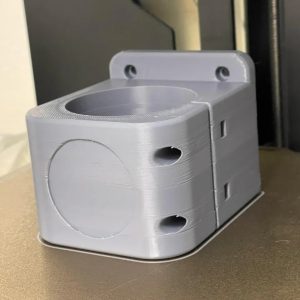
Once I had this printed on my Bambu, it was a simple swap to get this bad boy rigged up and ready to produce chips.

No, you still can’t move fast, that is largely due to the stepper motors and the backlash that would be introduced, but with a more powerful router, you can cut harder materials and cut deeper on softer materials so that the upper-speed limit is not as limiting as it might seem.
Once you have a 65mm spindle, you also have many options for dust shoes, both off the shelf and 3D printed, into the bargain!
Conclusion
The TwoTrees TTC-450 Pro is a rigid, beautifully designed, low-cost desktop CNC machine with the potential to handle advanced projects provided you combine it with the 500W spindle upgrade.
Keeping in mind the need for that added purchase, it is still great value for money, and once you have it up and running it should more than succeed with anything you throw at it, if a little slower than a higher-priced CNC.

 Elegoo Mars 5 Ultra Review