

I can’t belive it has taken me this long to write my xTool F1 review because it’s rare that my wife falls in love with one of our machines.
Not since the Glowforge has she been so enthusiastic about what a tool can do for her business.
This little guy is a great portable laser with both a blue diode for regular laser tasks and an RF laser for engraving metal and creating really fine details.
The blue light diode laser is 10 watts, making it ideal for materials like wood, while the RF (infrared) laser can handle metals, like stainless steel, which the blue diode can’t.
Real xTool F1 Projects: What Can it Do?
Clare immediately put it to work making artwork for her shipping boxes. Paying for custom boxes was very expensive and required predicting how many she would need in advance. Now she can add the artwork to each box just before shipping it out!

The xTool F1 engraves super fast. Since it’s a galvo laser, there are no moving parts like an X/Y axis or bed. Instead, it uses mirrors to direct the laser, achieving speeds up to 4,000 mm per second. This speed is much faster than typical diode or CO2 lasers, making it incredibly efficient for high-volume work.
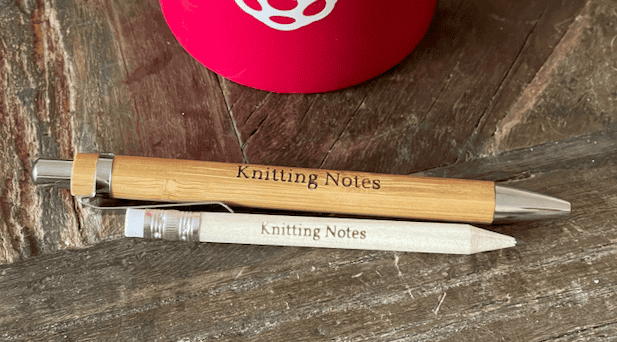
While this machine is small compared to other machines, that makes it easy to lug around, you can throw it on a passenger seat or hockey bag, and it’s perfectly proportioned for personalized craft items.
In addition to the speed and portability, the xTool F1 is easy to use. Clare found the software straightforward and intuitive, meaning she could get started right away without a steep learning curve.
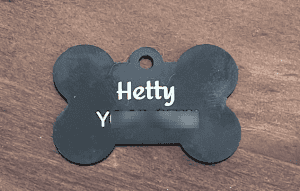
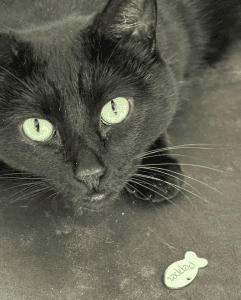
It’s not just for business either. We’ve used it for personal projects, like making custom keychains, a dog tag for our puppy, and gifts for friends and family.
The ability to quickly switch between different types of materials and projects makes it a versatile addition to our workshop.
xTool F1: Review of the Design and Features
The machine looks great, and a lot of care has been taken in aesthetics and usability above and beyond the utilitarian approaches of other machines. It really looks like a high-end appliance, something you would be happy to have around and not just need to have around.
- The xTool F1 is unique because it has two types of lasers built right in:
- Blue Light Diode Laser: This 10-watt laser can engrave materials like wood and opaque acrylic beautifully. It’s on the lower end of the power spectrum, but it is still more powerful than the Glowforge diode machines, and it can cut the usual materials using slower speeds or multiple passes.
- IR Laser: This laser can engrave metals, such as stainless steel, which the blue diode laser cannot. The output is super fine resolution, too.
- It’s meant for engraving, and for this it is surprisingly fast. Achieve speeds up to 4,000 mm per second.
- Adjusting the focus is easy with the control button allowing you to move the Z up and down manually, or select the material height in software.
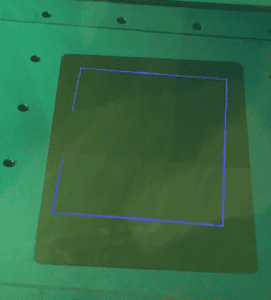
- The work area is small, about 115 square millimeters (4.5 inches on each side) but this makes it highly portable, and it is perfectly adequate for the branding, personalization, and embellishment tasks it is going to be put to.
- There’s an emergency stop button for added safety, and the F1’s iconic green enclosure isn’t just for looks. It slides up and down, only allowing the laser to operate when it’s shut. The enclosure has an exhaust port for venting fumes, which is great for indoor use.
- It is LightBurn compatible, but xTool’s free software, Creative Space, is impressive and keeps getting better.
- You can also connect to the machine directly via USB or over Wi-Fi, with no cloud service necessary.
xTool F1 Pros and Cons
No xTool F1 review would be complete without a list of pros and cons, but for me the advantages and downsides are pretty obvious because the engraver has been purpose designed for a particular and specific use-case:
Pros:
- Portable – It even has a handle!
- Versatile – Two types of lasers in one machine.
- Fast – uses mirrors rather than gantry X/Y movement.
- Safe – fully enclosed design with exhaust.
- Easy – software, focusing, and positioning very intuitive.
Cons:
- Smaller work area.
- Lower laser power.
So, again, no surprises and I am sure all xTool F1 reviews will say the same thing. As you will see soon in a future review, overcoming the limitations of this machine makes it too large and heavy to be truly portable. Yes, that is a sneaky teaser!
xTool F1 Review Conclusion
The xTool F1 is a great option for those who need a portable and versatile laser engraver. It’s especially useful for craft markets or on-site engraving.
If you need to engrave wood and metal, for example marking tools, putting names on trophies, gift personalization, then this machine’s dual lasers make it a strong choice.
Overall, the xTool F1 has been a game-changer for us, combining convenience, speed, and precision in a cute and compact package. Whether for business or personal use, it’s proven to be a valuable tool that we now can’t imagine being without.

 Creality Falcon 2 Pro 60W: A World’s First?